P.S. Due to the confidential nature of this project, only limited details can be shared. Feel free to reach out—I’d be happy to discuss more in a one-on-one conversation! 🥤
M365 Copilot Agents
During my time at MSFT, I focused on improving workflow efficiency across the Copilot experience in Microsoft Teams, WXP AppChat, and M365 Copilot.
I reimagined the agent experience to better meet the needs of Microsoft partners and customers by designing AI solutions.
Timeline
5 months, 2025
Team
Copilot Designers, CAPE PMs, 3rd Party Partners
Tools
Figma, Figjam
Role
UX Design, Visual Design

REQUIREMENT GATHERING
The Scope
Through conversations with high-value Microsoft partners and customers, including LexisNexis, ServiceNow, and Accenture etc., we identified key friction points in the Copilot agent experience.
These included challenges around …
Agent Productivity
Need of structure in agent responses that result in comprehensive outputs
Agent Discovery
Limited agent functionality across certain areas of Copilot
Agent Framework
Inefficient workflows caused by the absence of a cohesive agent framework
1
Contract review via Copilot Agent in MS Word
WHAT I DID
Bridging Gaps
The Problem
Microsoft’s partner companies—LexisNexis, ICERTIS, Thomson Reuters often face time-consuming contract templates, scattered feedback, and high cognitive load when analyzing dense contracts—slowing down their workflow.
I collaborated with a PM and Design Director to reimagine the contract review experience within Microsoft Word Copilot to reduce legal review time for productivity.
Current Workflow
Users rely on Copilot chat to ask about contract templates.
One-on-one, chat-based conversations with the agent to identify issues within the contract and edit the document based on agent's response.

Pain Points

Thread Overload
Mentally taxing to maintain conversation threads and keep track

Poor Traceability
Hard to map discrepancies and suggested changes to the exact spots in the document.

Workflow Slowdown
Slows down productivity, especially in time-sensitive workflows

Prompt Rework
Repetitive prompts and clarifications to gain more information
EXPLORATION A
Canvas Model
I designed a separate tab within the Copilot canvas to view all the issues detected within the document via the agent.

EXPLORATION B
Comment Model
I added an experience where suggestions can be added as comments by the Contoso agent in the document itself.

Canvas Model Comment Model was preferred as the agent felt more like a collaborator than just a tool, but…
Overcrowding
The document can get overcrowded with comments inserted by the agent.
User control over agent suggestion to insert the agent’s comment or dismiss it
Hard to prioritize
Comments didn’t naturally create a ranked view, leading to low scannability of severity and inability to take quick actions
Hierarchy of severity of issue for easy, quick glance and faster actions
Canvas Model

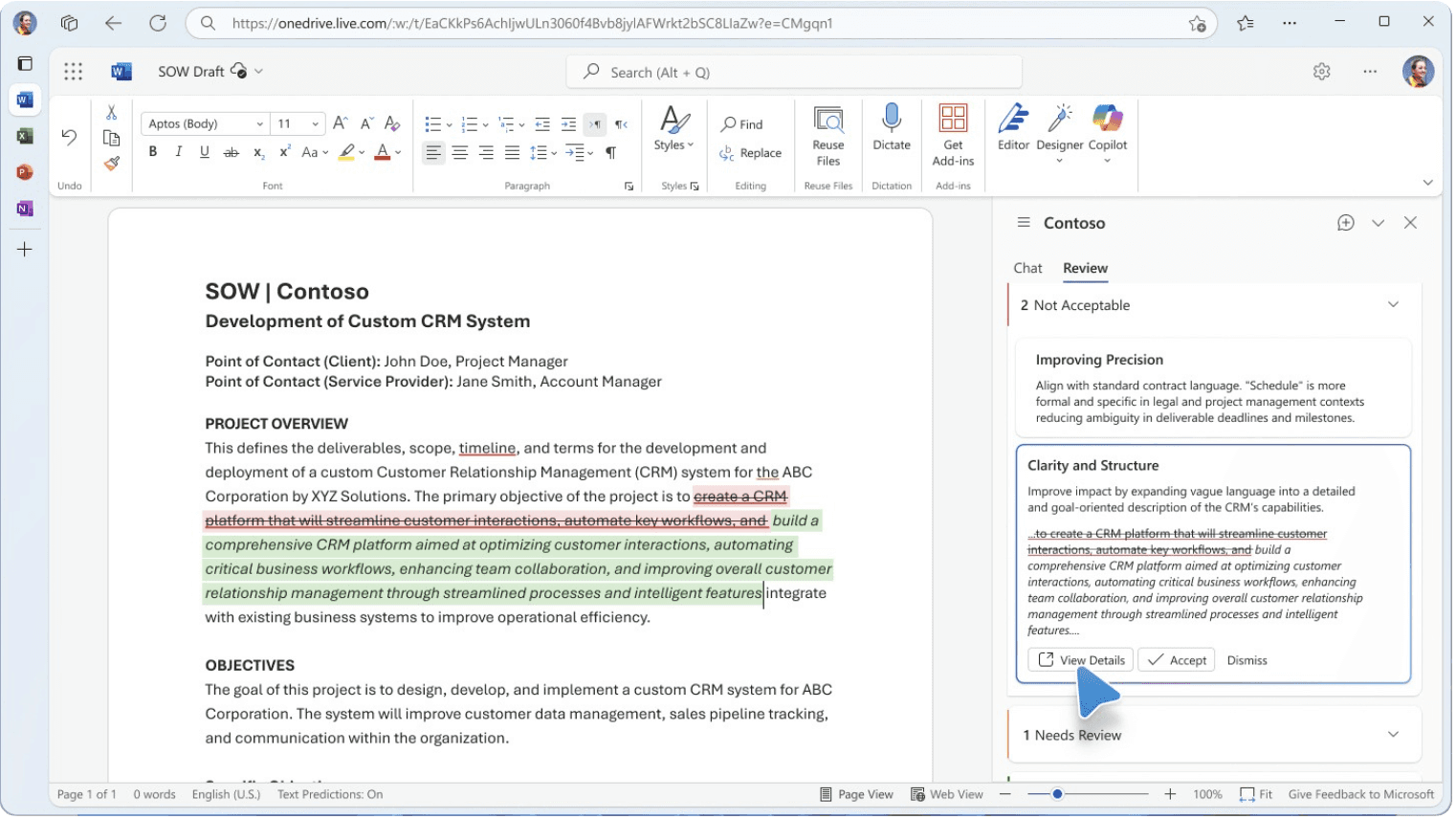
Comment Model


SOLUTION
Combining Canvas Experience with the Comment Model

Users add only the suggestions they consider necessary to change or to discuss with collaborators within the doc.

Suggestions added as comments can be accepted/dismissed by collaborators. Relevant references supporting the suggestions are available.
2
Agents in M365 Copilot Notebooks
The Problem
Users need the ability to categorize agent chats by topic or project—for example, legal matters tied to specific project/notebook. While Copilot Notebooks support chat categorization of Copilot chats, it currently doesn’t allow agent chats to be organized within them.
The Opportunities
Streamline Information Organization
Allowing users to group AI interactions within meaningful project or topic-based structures, improving clarity and focus.
Enable Deeper Context Retention
Integrating agent conversations into existing workflows, fostering continuity and effective long-term collaboration.
SOLUTION
Adding an agent chat in a newly created Notebook

Entrypoint
Entrypont to add agent chat to a Notebook

Add Agents
Ability to add agents to newly created Notebooks while adding chats to a Notebook

Chat + Agent Visibility
Chat added to a Notebook appears with the corresponding agent's logo and symbol
SOLUTION
Accessing Agent chats from within a Notebook

Chat Breadcrumbs
Breadcrumbs in chats provide easy visibility into associated agents within the Notebook
SOLUTION
Adding agents to a Notebook

Notebook Page
All Notebooks and their associated agents are visible on the Notebooks page.

Agents Tab
"Agents" tab within each Notebook allows users to add agents.

Search Agents
Search for the agent to add via pop-up within the Notebook

Agent Added
Agent that has been added is visible and accessible from within the Notebook

Notebook + Agent Breadcrumb
Breadcrumbs in agent chat provided when the agent is accessed via the Notebook
3
Agent Responses in Bizchat
The Problem
Users struggle to interpret and act on agent responses when information is presented in dense, unstructured formats. Current designs lack support for modular responses, clear visualization of complex data, and readability of descriptive content—leading to cognitive overload and reduced engagement.
The Opportunities
Return Multiple Adaptive Cards
Support responses that include several cards to present actions, summaries, or related information in a modular, user-friendly format.
Display Complex Data Clearly
Structure detailed information—like tables, metrics, or comparisons—into adaptive cards for better scannability and understanding.
Present Descriptive Content
Use adaptive cards to convey detailed explanations or context while maintaining visual hierarchy and clarity.
Avoid Cognitive Overload
Break down lengthy text into smaller chunks using sections, labels, or collapsible elements to keep the interface clean + readable.
SOLUTION
Interactive multi-data cards

Complex Data Presentation
View data-heavy cards in a neat + organized layout for easy readability

Real-time Interactions
Interact with cards—such as real-time stock details of companies—to explore graphs + data effectively.
SOLUTION
Text-heavy expandable cards

Streamlined Consumption
Easily understand text-heavy responses via collapsible sections.

Dynamic Editing Experiences
Expandable content to provide a more immersive experience for understanding or editing information within Microsoft Pages.
SOLUTION
Switchable view cards

Toggleable Information
Switch between views to access detailed insights within the interface.

Embedded 3D Interactions
Engage with 3D visualizations directly for a richer experience
WHAT I LEARNED
Impact
“Would love to see this soon in Copilot, this will really boost our productivity”
-PM @ LexisNexis
Outcome
Partner & VP feedback
Positive
Sentiments
Expected outcomes
Review time
from hrs to mins
Well received by leadership - VP of PM @ M365 Platform, Design Directors, PMs @CAPE
Strong green signal to pursue these explorations further, influencing future directions
The project began with raw feedback from customers and partners. While this user-first approach surfaced valuable insights, it also introduced unstructured requirements and conflicting needs. By diving deep into the root of each ask, I was able to identify patterns, bring clarity to the chaos, and streamline user interactions with AI — ultimately driving agent growth within Copilot.
If I had more time…
While the project was grounded in enterprise pain points, I’d prioritize more primary research like contextual inquries.
Conduct usability tests, like A/B tests, to understand which experience provides better experience.
Pursue features like - ability to view version history of changes via the agent within contracts, contract comparison in modules.
OTHER CUSTOMER + PARTNER WORK
Design Gallery
Collaborated with 15+ partner companies, PMs, and engineers to design third-party Copilot experiences within Microsoft Teams, Word, Excel, and Powerpoint, showcased in Build 2025.


Let's connet!


c
2026 Aditi Gupta